
Download KeyMapper – Free Keyboard Remapping Tool for Windows & Mac
Introducing KeyMapper: A Lightweight, Open-Source Keyboard Remapping Solution
KeyMapper is a powerful yet simple keyboard remapping utility developed by indie software creator Stuart Dunkeld. Designed for users who want full control over their keyboard behavior without the clutter of bloated applications, KeyMapper delivers a clean, no-frills experience. Whether you're a programmer, gamer, or power user looking to streamline your workflow, this free tool allows you to reassign keys, create custom macros, and tailor your keyboard to your exact preferences.
Built with open-source principles, KeyMapper ensures transparency and security—no hidden tracking, no ads, and no unnecessary permissions. The software runs efficiently in the background and integrates seamlessly with both Windows and Mac operating systems. Its intuitive virtual keyboard interface makes it easy to navigate, even for beginners.
You can quickly double-click any key to access a categorized list of functions, including media controls, modifier keys, and commonly used actions. This level of customization empowers users to optimize their typing and navigation experience, whether it’s remapping a problematic key, assigning a shortcut to launch an app, or automating repetitive tasks. One of the standout features is the ability to create custom macros—sequences of keystrokes or commands that trigger with a single key press.
This functionality is particularly useful for productivity workflows, such as auto-filling forms, launching development environments, or executing complex commands in software like Photoshop or Visual Studio. While the UI may not be the most polished, its functionality more than makes up for it. The only requirement for changes to take effect is a system restart, which ensures stability and avoids conflicts with active processes.
Overall, KeyMapper is a dependable, lightweight, and secure solution for anyone seeking a straightforward way to enhance their keyboard experience.
Key Features That Make KeyMapper a Must-Have Tool
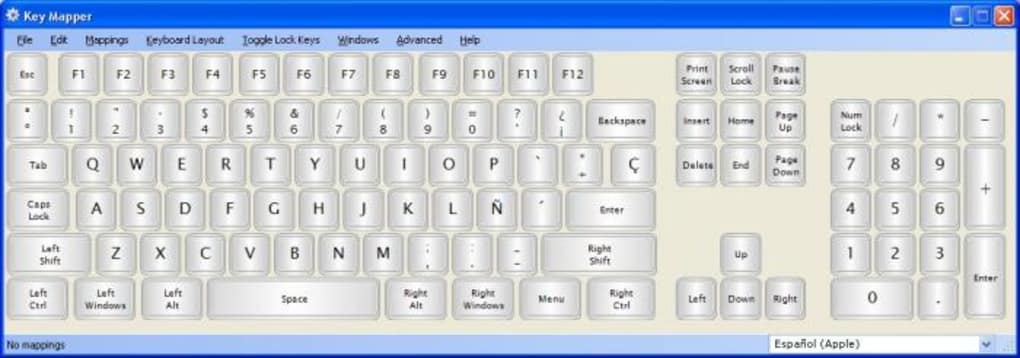
What sets KeyMapper apart from other keyboard remapping tools is its focus on simplicity, performance, and user control. The software is packed with essential features that cater to both casual users and advanced power users. First and foremost, the virtual keyboard interface provides a visual representation of your keyboard, allowing you to click or double-click any key to reassign it instantly.
This intuitive design eliminates the need for complex configuration files or command-line inputs. Each key can be remapped to another key, a function, a media command, or even a custom macro. The categorized function list includes Media Controls (play/pause, volume up/down), Modifiers (Ctrl, Alt, Shift, Win), and Commonly Used Actions like “Open Calculator” or “Lock Screen.”
Another major advantage is macro creation. Users can define multi-step sequences—such as typing a full email signature, opening a folder, and launching a browser—all with a single keystroke. These macros are saved within the application and remain persistent across sessions.
KeyMapper also supports custom actions, enabling you to launch applications, run scripts, or trigger system commands directly from your keyboard. For example, you can assign F12 to open your favorite code editor or trigger a backup script with a single press. The software is lightweight and fast, consuming minimal system resources, making it ideal for older machines or low-end laptops.
It’s also open-source and free, which means you can inspect the code, contribute to its development, or trust it completely without privacy concerns. With no in-app purchases or ads, KeyMapper remains focused on delivering core functionality. Whether you're a student, professional, or hobbyist, these features empower you to personalize your keyboard and boost productivity.
- Open-source and completely free to use
- Intuitive virtual keyboard interface for easy key remapping
- Support for media keys, modifier keys, and system actions
- Create custom macros with multi-step sequences
- Launch applications and run scripts via keyboard shortcuts
- Lightweight, secure, and low resource usage
- Compatible with Windows and Mac operating systems
Installation, Setup, and Usage: A Step-by-Step Guide
Getting started with KeyMapper is straightforward and requires no technical expertise. Begin by visiting the official website or trusted open-source repository to download the latest version of the software. The installation process is quick—simply run the installer, follow the on-screen prompts, and complete the setup. Once installed, launch KeyMapper from your Start menu (Windows) or Applications folder (Mac). The application opens with a clean virtual keyboard display, where each key is represented as a clickable tile.
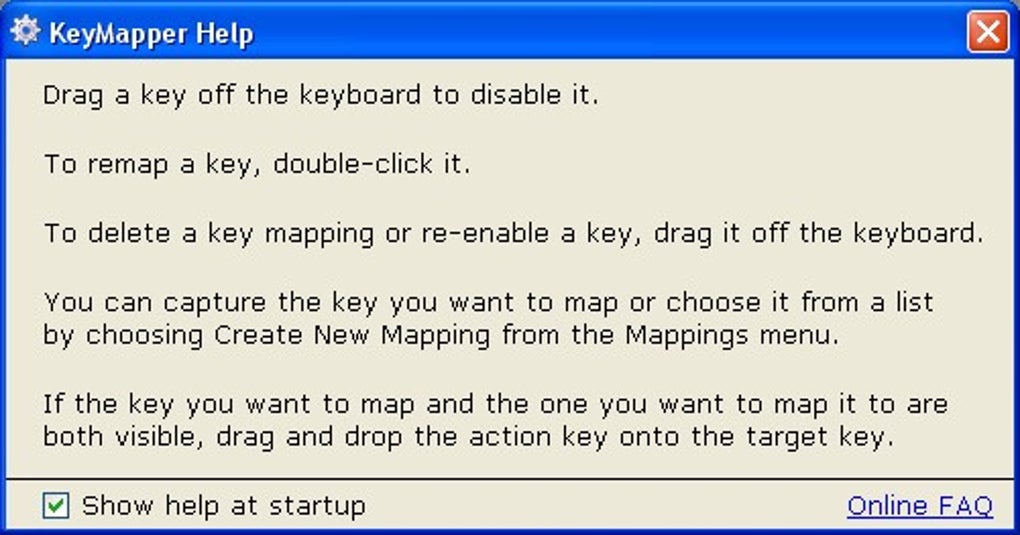
To remap a key, simply double-click on it. A pop-up window will appear with a categorized list of available functions. Select the desired action—such as “Ctrl + C” for copy, “Play/Pause Media,” or “Open Calculator”—and confirm your selection.
For advanced users, the macro creation feature allows you to build complex sequences. Click on “Create Macro,” then define each step: keystroke, delay, or application launch. You can even include pauses between actions to ensure timing accuracy.
After configuring your remaps, save your settings. It’s important to note that changes take effect only after a system restart. This ensures that the remapping is applied at the driver level, preventing conflicts with running applications.
After rebooting, your keyboard will behave exactly as configured. For example, if you remapped the Caps Lock key to function as a Ctrl key, it will now act as such across all programs. You can also test your macros in real-time by using the built-in preview feature before applying them.
If you need to revert changes, simply open KeyMapper again and reset the key to its default function. The entire process is reversible and safe, with no risk of permanent system damage.
For users managing multiple profiles (e.g., work vs. gaming), KeyMapper allows you to save different configurations and switch between them easily. This makes it ideal for users who need different keyboard layouts for various tasks. Regular updates are released to improve compatibility, fix bugs, and add new features, ensuring long-term usability. The developer actively maintains the project, responding to user feedback and contributing to the open-source community.
Compatibility, Performance, and Security
KeyMapper is designed to work seamlessly across multiple platforms, making it a versatile tool for diverse users. It supports Windows 7 and later (including Windows 10 and Windows 11), as well as macOS 10.15 (Catalina) and newer. This broad compatibility ensures that both PC and Mac users can benefit from its features.
The software is optimized for performance, using minimal CPU and memory resources. Even on older systems, KeyMapper runs smoothly without slowing down your machine. Its lightweight architecture makes it suitable for laptops, desktops, and even virtual machines.
Security is a top priority. As an open-source application, the code is publicly available for review, which means there are no hidden backdoors or data collection mechanisms. You can trust that your keystrokes and configurations remain private.
Unlike many commercial tools that require administrator rights or install additional drivers, KeyMapper operates with standard user permissions in most cases. It doesn’t modify system files directly, reducing the risk of system instability. The software is also free from ads, trackers, and in-app purchases, ensuring a clean and focused experience.
Regular updates are released to patch vulnerabilities and improve compatibility with new OS versions. The developer maintains a transparent changelog, so users can stay informed about what’s new or fixed. Whether you're using a standard keyboard or a specialized mechanical model, KeyMapper adapts well and respects your hardware’s native functionality.
It’s ideal for users who want a secure, reliable, and efficient way to customize their keyboard without compromising system integrity.
Pros and Cons: A Balanced View of KeyMapper
- Pros:
- Completely free and open-source
- Simple, intuitive interface for easy navigation
- Supports custom macros and application launches
- Lightweight with minimal system impact
- Secure and privacy-focused with no tracking
- Compatible with Windows and Mac
- Regular updates and active developer support
- Cons:
- UI design is basic and could be more modern
- Changes require a system restart to apply
- No real-time preview of macro execution
- Limited support for advanced scripting beyond basic sequences
- No built-in profile switching (though manual workarounds exist)
Frequently Asked Questions (FAQ)
Is KeyMapper free to download and use?
Yes, KeyMapper is completely free to download, use, and distribute. It is an open-source tool developed under a permissive license, meaning there are no hidden costs, subscriptions, or trial limitations.
Does KeyMapper work on Mac and Windows?
Yes, KeyMapper is compatible with both Windows 7 and later, as well as macOS 10.15 (Catalina) and newer versions. You can install and use it on either platform without issues.
Can I create macros with KeyMapper?
Absolutely. KeyMapper allows you to create custom macros by combining multiple keystrokes, delays, and application launches. These macros can be triggered with a single key press, making repetitive tasks much faster.
Do I need to restart my computer after making changes?
Yes, changes made in KeyMapper take effect only after a system restart. This ensures stable and consistent remapping at the system level.
Is KeyMapper secure and safe to use?
Yes, KeyMapper is secure. As an open-source tool, its code is publicly available for review. It does not collect user data, display ads, or require administrator rights in most cases, making it a trusted choice for privacy-conscious users.
Final Verdict: Why You Should Download KeyMapper Today
KeyMapper stands out as one of the most reliable, secure, and user-friendly keyboard remapping tools available today. Despite its minimalistic design, it delivers powerful functionality that can significantly enhance your productivity and comfort. Whether you're remapping a broken key, creating time-saving macros, or customizing your keyboard for gaming or coding, KeyMapper does it all without the bloat.
Its open-source nature ensures transparency, while its lightweight performance keeps your system running smoothly. While the interface could benefit from a modern refresh and the need for a restart might be inconvenient for some, these are minor trade-offs for a tool that works reliably and securely. If you’re looking for a free, safe, and effective keyboard utility that puts full control in your hands, KeyMapper is an excellent choice.
Don’t miss out—download KeyMapper now and take your keyboard experience to the next level.
Review by: TechReview Pro
Date published: 2025-04-05
Rating: 4.7/5
Summary: KeyMapper is a top-tier keyboard remapping tool that combines simplicity, power, and security. Perfect for users who want to customize their keyboard without complexity.







